Categories
Uncategorized

Login เข้า Windows ไม่ต้องใส่ password

วิธีทำ ทำได้หลาย วิธี แต่วิธี ตั้งค่า ใน registry ดีที่สุด

เข้า regedit ที่ run หรือช่องค้นหา

ไปตาม part นี้

Computer\HKEY_LOCAL_MACHINE\SOFTWARE\Microsoft\Windows NT\CurrentVersion\Winlogon

DefaultUserName. Click on the Modify

create a new string value like this: DefaultPassword

create a new string value : AutoAdminLogon (In the Value data text box, ensure its value is 1. If it has a 0, erase it, and type in 1. Select the OK button.)


Categories
Uncategorized

ยกเลิกวันหมดอายุ PASSWORD Windows ( กำหนดให้ password ไม่หมดอายุ)

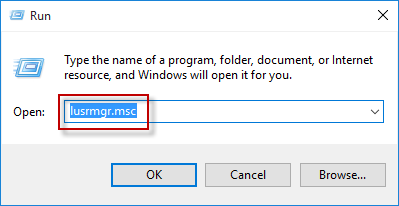
เปิด lusrmgr.msc วิธีเปิดมีหลายวิธี

  1. พิมพ์ lusrmgr.msc ในช่อง ค้นหา หรือ RUN
  2. พิมพ์ lusrmgr ใช่ CMD หรือ PowerShell

ไปยัง Local Users and Groups >> Users. On the right pane, double-click on your user account.
Select the check box of “Password never expired”, and then click on OK to disable Windows 10 password expiration.

Categories
Uncategorized

เปลี่ยน วันหมดอายุ password windows

วิธีที่ 1 . Run gpedit.msc

Computer Configuration > Windows Settings > Security Settings > Local Policies > Security Options.

วิธีที่ 2 Run regedit and navigate to the following key:

HKEY_LOCAL_MACHINE\SOFTWARE\Microsoft\Windows NT\CurrentVersion\Winlogon

Set the value of PasswordExpiryWarning to the period you want and Exit.