| Control Panel Item | Commands |
| Add a Device wizard | %windir%\System32\DevicePairingWizard.exe |
| Add Hardware wizard | %windir%\System32\hdwwiz.exe |
| Add a Printer wizard | rundll32.exe shell32.dll,SHHelpShortcuts_RunDLL AddPrinter |
| Additional Clocks | rundll32.exe shell32.dll,Control_RunDLL timedate.cpl,,1 |
| Administrative Tools | control /name Microsoft.AdministrativeToolsOR control admintools |
| AutoPlay | control /name Microsoft.AutoPlay |
| Backup and Restore (Windows 7) | control /name Microsoft.BackupAndRestoreCenter |
| BitLocker Drive Encryption | control /name Microsoft.BitLockerDriveEncryption |
| Color and Appearance | explorer shell:::{ED834ED6-4B5A-4bfe-8F11-A626DCB6A921} -Microsoft.Personalization\pageColorization |
| Color Management | control /name Microsoft.ColorManagement |
| Credential Manager | control /name Microsoft.CredentialManager |
| Date and Time (Date and Time) | control /name Microsoft.DateAndTimeOR control timedate.cplOR control date/timeOR rundll32.exe shell32.dll,Control_RunDLL timedate.cpl,,0 |
| Date and Time (Additional Clocks) | rundll32.exe shell32.dll,Control_RunDLL timedate.cpl,,1 |
| Default Programs | control /name Microsoft.DefaultPrograms |
| Desktop Background | explorer shell:::{ED834ED6-4B5A-4bfe-8F11-A626DCB6A921} -Microsoft.Personalization\pageWallpaper |
| Desktop Icon Settings | rundll32.exe shell32.dll,Control_RunDLL desk.cpl,,0 |
| Device Manager | control /name Microsoft.DeviceManagerOR control hdwwiz.cplOR devmgmt.msc |
| Devices and Printers | control /name Microsoft.DevicesAndPrintersOR control printers |
| Ease of Access Center | control /name Microsoft.EaseOfAccessCenterOR control access.cpl |
| File Explorer Options (General tab) | control /name Microsoft.FolderOptionsOR control foldersOR rundll32.exe shell32.dll,Options_RunDLL 0 |
| File Explorer Options (View tab) | rundll32.exe shell32.dll,Options_RunDLL 7 |
| File Explorer Options (Search tab) | rundll32.exe shell32.dll,Options_RunDLL 2 |
| File History | control /name Microsoft.FileHistory |
| Fonts | control /name Microsoft.FontsOR control fonts |
| Game Controllers | control /name Microsoft.GameControllersOR control joy.cpl |
| Get Programs | control /name Microsoft.GetProgramsOR rundll32.exe shell32.dll,Control_RunDLL appwiz.cpl,,1 |
| HomeGroup | control /name Microsoft.HomeGroup |
| Indexing Options | control /name Microsoft.IndexingOptionsOR rundll32.exe shell32.dll,Control_RunDLL srchadmin.dll |
| Infrared | control /name Microsoft.InfraredOR control irprops.cplOR control /name Microsoft.InfraredOptions |
| Internet Properties (General tab) | control /name Microsoft.InternetOptionsOR control inetcpl.cplOR rundll32.exe shell32.dll,Control_RunDLL inetcpl.cpl,,0 |
| Internet Properties (Security tab) | rundll32.exe shell32.dll,Control_RunDLL inetcpl.cpl,,1 |
| Internet Properties (Privacy tab) | rundll32.exe shell32.dll,Control_RunDLL inetcpl.cpl,,2 |
| Internet Properties (Content tab) | rundll32.exe shell32.dll,Control_RunDLL inetcpl.cpl,,3 |
| Internet Properties (Connections tab) | rundll32.exe shell32.dll,Control_RunDLL inetcpl.cpl,,4 |
| Internet Properties (Programs tab) | rundll32.exe shell32.dll,Control_RunDLL inetcpl.cpl,,5 |
| Internet Properties (Advanced tab) | rundll32.exe shell32.dll,Control_RunDLL inetcpl.cpl,,6 |
| iSCSI Initiator | control /name Microsoft.iSCSIInitiator |
| Keyboard | control /name Microsoft.KeyboardOR control keyboard |
| Language | control /name Microsoft.Language |
| Mouse Properties (Buttons tab 0) | control /name Microsoft.MouseOR control main.cplOR control mouseOR rundll32.exe shell32.dll,Control_RunDLL main.cpl,,0 |
| Mouse Properties (Pointers tab 1) | control main.cpl,,1OR rundll32.exe shell32.dll,Control_RunDLL main.cpl,,1 |
| Mouse Properties (Pointer Options tab 2) | control main.cpl,,2OR rundll32.exe shell32.dll,Control_RunDLL main.cpl,,2 |
| Mouse Properties (Wheel tab 3) | control main.cpl,,3OR rundll32.exe shell32.dll,Control_RunDLL main.cpl,,3 |
| Mouse Properties (Hardware tab 4) | control main.cpl,,4OR rundll32.exe shell32.dll,Control_RunDLL main.cpl,,4 |
| Network and Sharing Center | control /name Microsoft.NetworkAndSharingCenter |
| Network Connections | control ncpa.cplOR control netconnections |
| Network Setup Wizard | control netsetup.cpl |
| Notification Area Icons | explorer shell:::{05d7b0f4-2121-4eff-bf6b-ed3f69b894d9} |
| ODBC Data Source Administrator | control odbccp32.cpl |
| Offline Files | control /name Microsoft.OfflineFiles |
| Performance Options (Visual Effects) | %windir%\system32\SystemPropertiesPerformance.exe |
| Performance Options (Data Execution Prevention) | %windir%\system32\SystemPropertiesDataExecutionPrevention.exe |
| Personalization | explorer shell:::{ED834ED6-4B5A-4bfe-8F11-A626DCB6A921} |
| Phone and Modem | control /name Microsoft.PhoneAndModemOR control telephon.cpl |
| Power Options | control /name Microsoft.PowerOptionsOR control powercfg.cpl |
| Power Options – Advanced settings | control powercfg.cpl,,1 |
| Power Options – Create a Power Plan | control /name Microsoft.PowerOptions /page pageCreateNewPlan |
| Power Options – Edit Plan Settings | control /name Microsoft.PowerOptions /page pagePlanSettings |
| Power Options – System Settings | control /name Microsoft.PowerOptions /page pageGlobalSettings |
| Presentation Settings | %windir%\system32\PresentationSettings.exe |
| Programs and Features | control /name Microsoft.ProgramsAndFeaturesOR control appwiz.cpl |
| Recovery | control /name Microsoft.Recovery |
| Region (Formats tab) | control /name Microsoft.RegionAndLanguageOR control /name Microsoft.RegionalAndLanguageOptions /page /p:"Formats"OR control intl.cplOR control international |
| Region (Location tab) | control /name Microsoft.RegionalAndLanguageOptions /page /p:"Location" |
| Region (Administrative tab) | control /name Microsoft.RegionalAndLanguageOptions /page /p:"Administrative" |
| RemoteApp and Desktop Connections | control /name Microsoft.RemoteAppAndDesktopConnections |
| Scanners and Cameras | control /name Microsoft.ScannersAndCamerasOR control sticpl.cpl |
| Screen Saver Settings | rundll32.exe shell32.dll,Control_RunDLL desk.cpl,,1 |
| Security and Maintenance | control /name Microsoft.ActionCenterOR control wscui.cpl |
| Set Associations | control /name Microsoft.DefaultPrograms /page pageFileAssoc |
| Set Default Programs | control /name Microsoft.DefaultPrograms /page pageDefaultProgram |
| Set Program Access and Computer Defaults | rundll32.exe shell32.dll,Control_RunDLL appwiz.cpl,,3 |
| Sound (Playback tab) | control /name Microsoft.SoundOR control mmsys.cplOR %windir%\System32\rundll32.exe shell32.dll,Control_RunDLL mmsys.cpl,,0 |
| Sound (Recording tab) | %windir%\System32\rundll32.exe shell32.dll,Control_RunDLL mmsys.cpl,,1 |
| Sound (Sounds tab) | %windir%\System32\rundll32.exe shell32.dll,Control_RunDLL mmsys.cpl,,2 |
| Sound (Communications tab) | %windir%\System32\rundll32.exe shell32.dll,Control_RunDLL mmsys.cpl,,3 |
| Speech Recognition | control /name Microsoft.SpeechRecognition |
| Storage Spaces | control /name Microsoft.StorageSpaces |
| Sync Center | control /name Microsoft.SyncCenter |
| System | control /name Microsoft.SystemOR control sysdm.cpl |
| System Icons | explorer shell:::{05d7b0f4-2121-4eff-bf6b-ed3f69b894d9} \SystemIcons,,0 |
| System Properties (Computer Name) | %windir%\System32\SystemPropertiesComputerName.exe |
| System Properties (Hardware) | %windir%\System32\SystemPropertiesHardware.exe |
| System Properties (Advanced) | %windir%\System32\SystemPropertiesAdvanced.exe |
| System Properties (System Protection) | %windir%\System32\SystemPropertiesProtection.exe |
| System Properties (Remote) | %windir%\System32\SystemPropertiesRemote.exe |
| Tablet PC Settings | control /name Microsoft.TabletPCSettings |
| Text Services and Input Languages | rundll32.exe Shell32.dll,Control_RunDLL input.dll,,{C07337D3-DB2C-4D0B-9A93-B722A6C106E2} |
| Text to Speech | control /name Microsoft.TextToSpeech |
| Troubleshooting | explorer shell:::{26EE0668-A00A-44D7-9371-BEB064C98683}\0\::{C58C4893-3BE0-4B45-ABB5-A63E4B8C8651} |
| User Accounts | control /name Microsoft.UserAccountsOR control userpasswords |
| User Accounts (netplwiz) | netplwizOR control userpasswords2 |
| Windows Defender Firewall | control /name Microsoft.WindowsFirewallOR control firewall.cpl |
| Windows Defender Firewall Allowed apps | explorer shell:::{4026492F-2F69-46B8-B9BF-5654FC07E423} -Microsoft.WindowsFirewall\pageConfigureApps |
| Windows Defender Firewall with Advanced Security | %WinDir%\System32\WF.msc |
| Windows Features | %windir%\System32\OptionalFeatures.exeOR rundll32.exe shell32.dll,Control_RunDLL appwiz.cpl,,2 |
| Windows Mobility Center | control /name Microsoft.MobilityCenter |
| Work Folders | %windir%\System32\WorkFolders.exe |
ผู้เขียน: sunti
แปลงตัวอักษรที่อ่านไม่ได้ให้เป็นอักษรอ่านได้ ปัญหานี้เกิดขึ้นกลับหลายคน ถ้าย้อนกลับไปเปิดอ่านเอกสารหรือไฟล์เก่า เพราะระบบตัวอักษรของคอมพิวเตอร์มีการเปลี่ยนแปลงมาใช้ Encoder เป็นแบบ UNICODE UTF8 ตัวอักษรแบบเก่าที่เคยใช้จะเป็น Charector WideChar Char16_t หรือที่เราคุ้นเคยคือ( TIS-620 สำหรับภาษาไทย) กลุ่มตระกูล Widechar มีหลาย Encoder แต่ละภาษจะมี encoder เป็นของตัวเอง จึงเรียกแบบรวมๆง่ายๆว่า Non-Unicode ไปเลย
การกำหนดมาตรฐานของตัวอักษรทั่วโลกให้อยู่ในมาตรฐานเดียวกัน จึงส่งผลกระทบกับตัวอักษรในระบบเก่าคือ เมื่อนำมาเปิดจะอ่านไม่ได้ เป็นภาษาต่างดาว เพราะรูปแบบของ Encoder ไม่ตรงกัน
วิธีแก้ตัวอักษรต่างดาวที่หลายคนทำ
วิธีแก้สวนใหญ่ จะไปแก้ที่ตัวของ windows ใน Language Region โดยให้ windows ใช้กับ font ที่เป็น Non-Unicode แทน ก็ได้อย่าเสียอย่าง เราก็มาอ่านเอกสารแบบเก่าได้ แต่ก็ใช้แบบใหม่ได้ไม่เต็ม 100% และที่สำคัญเอกสารที่เราสร้างไปเปิดเครื่องอื่นไม่ได้เหมือนเดิม สำหรับคนไหนที่ใช้หลายภาษา เช่น จีน ญี่ปุ่น ต้องมานั่งแก้หลายเรื่อง
วิธีแก้ที่เหมาะสมคือการ เปลี่ยนรูปแบบตัวอักษร มาเป็น UTF8
Download Windows Seven Loader for Windows 7 Activation Tool
Windows Seven Loader is a popular tool used to activate Windows 7 operating systems. It helps users unlock the full features of their Windows 7 without needing to purchase a product key. This activation tool works by bypassing the system’s activation process, allowing users to enjoy a genuine Windows experience. Many people look for Windows Seven Loader because it is easy to use and supports various versions of Windows 7, including Home, Professional, and Ultimate editions.
Using Windows Seven Loader is straightforward. After downloading the tool, users can run it to activate their Windows 7 system quickly. This process is essential for those who want to avoid the limitations of an unactivated copy, such as restricted personalization options and frequent activation reminders. The tool is designed to be safe and reliable, making it a preferred choice for many users worldwide.
It is important to note that while Windows Seven Loader is effective, users should always download it from trusted sources to avoid malware or corrupted files. This activation tool has helped millions of people keep their Windows 7 systems fully functional and free from activation issues. Whether you are reinstalling Windows 7 or setting up a new computer, Windows Seven Loader can be a helpful solution for activation needs.
How to Download and Use Windows Seven Loader for Windows 7 and Windows 10 Activation
Windows Seven Loader is a handy tool for activating both Windows 7 and Windows 10 systems. It works by applying a special activation method that helps users unlock their operating system’s full features without needing an official product key. This tool is compatible with many versions of Windows and supports both 32-bit and 64-bit systems, including the windows loader 64-bit version. Using this loader along with a windows 10 activation tool or a windows 7 activation utility can make the activation process quick and easy.
Many people prefer this windows 7 activation program because it simplifies what can otherwise be a complicated process. Whether you want to activate Windows 7 or Windows 10, this loader offers a reliable solution. Below, you will find detailed information on downloading, installing, and using the Windows Seven Loader effectively.
Windows Seven Loader Free Download and 64-Bit Version Availability
When looking for the Windows Seven Loader, it is important to find a version that matches your system type. Most modern computers use 64-bit processors, so the windows loader 64-bit version is often the best choice. This version ensures compatibility and better performance during activation.
| Version Type | Compatibility | Features |
|---|---|---|
| 32-bit Loader | Older systems | Basic activation support |
| 64-bit Loader | Modern systems | Enhanced compatibility and speed |
The loader is available for free download and works well with both Windows 7 and Windows 10. Using the right version helps avoid errors during activation and ensures the windows 7 activation method works smoothly.
Step-by-Step Guide to Installing Windows Seven Loader Safely
Installing the Windows Seven Loader is simple if you follow these steps carefully:
-
Download the Correct Version
Choose the windows loader 64-bit or 32-bit version based on your system. -
Disable Antivirus Temporarily
Some antivirus programs may block the activation tool. Turn off protection temporarily. -
Run the Loader as Administrator
Right-click the file and select “Run as administrator” to give it the necessary permissions. -
Start the Activation Process
Use the windows 7 activation utility or windows 10 activation tool options within the loader. -
Restart Your Computer
After activation, reboot your system to apply changes. -
Re-enable Antivirus
Turn your antivirus protection back on to keep your system safe.
Following these steps ensures a safe and successful activation without harming your computer.
Using Windows Seven Loader to Activate Windows 7 Editions and Windows 10
The Windows Seven Loader supports multiple editions of Windows 7, including Home, Professional, and Ultimate. It also works as a windows 10 activation tool, making it versatile for users with different operating systems.
“Windows Seven Loader uses a unique windows 7 activation method that bypasses the usual product key requirement, allowing full access to Windows features.”
Here’s how it works for different systems:
- Windows 7 Activation Program: Activates all major editions by injecting a custom loader into the system.
- Windows 10 Activation Tool: Uses a similar method adapted for Windows 10 to activate the OS without a key.
This tool is trusted by many because it offers a quick and effective way to activate Windows without complicated steps.
Windows Seven Loader Old Version vs Latest Version Comparison
Choosing between the old and latest versions of Windows Seven Loader can affect your activation experience. Here’s a quick comparison:
| Feature | Old Version | Latest Version |
|---|---|---|
| Compatibility | Limited to older Windows 7 builds | Supports newer Windows 7 and Windows 10 builds |
| Stability | May cause errors or crashes | Improved stability and fewer bugs |
| Activation Speed | Slower activation process | Faster and more efficient activation |
| Support for 64-bit Systems | Basic 64-bit support | Full support for windows loader 64-bit |
The latest version is recommended for better performance and compatibility, especially if you want to use it as a windows 10 activation tool or a windows 7 activation utility.
Windows Seven Loader Features, Compatibility, and Activation Details
Windows Seven Loader is a tool designed to help users activate their Windows 7 operating system without using a traditional product key. This tool works by applying a special method that acts like a windows license bypass, allowing the system to think it is properly activated. By doing this, users can unlock windows functionality that is usually limited in unactivated versions, such as personalization options and access to updates.
This loader is often called a windows 7 activation utility because it simplifies the activation process. Instead of entering a product key, the loader modifies system files to trick Windows into accepting the activation. Some people refer to this process as a windows 7 activation hack because it bypasses the official activation system.
Using this tool can save time and effort, especially for those who reinstall Windows 7 frequently or do not have access to a valid product key. However, it is important to understand that this method is unofficial and may not be supported by Microsoft.
Windows 7 Editions Compatible with Windows Seven Loader
Windows Seven Loader supports many editions of Windows 7, making it a versatile activation tool. Here is a list of compatible editions:
- Windows 7 Starter
- Windows 7 Home Basic
- Windows 7 Home Premium
- Windows 7 Professional
- Windows 7 Ultimate
- Windows 7 Enterprise
| Edition | Activation Support | Notes |
|---|---|---|
| Starter | Yes | Basic edition, fully supported |
| Home Basic | Yes | Common in budget PCs |
| Home Premium | Yes | Popular for home users |
| Professional | Yes | Used in business environments |
| Ultimate | Yes | Full feature set, supported |
| Enterprise | Yes | For large organizations |
This wide compatibility ensures that most Windows 7 users can benefit from the loader to unlock windows functionality.
Can Windows Seven Loader Activate Windows 7 Ultimate, Professional, Home Premium, Enterprise, and Starter?
Yes, Windows Seven Loader can activate all these editions effectively. It uses a windows license bypass technique that works across different versions without needing separate tools. This makes it a convenient windows 7 activation utility for users with various editions.
The loader injects a custom activation module into the system, which tricks Windows into thinking it has been legitimately activated. This method is often called a windows 7 activation hack because it bypasses the normal activation checks.
Here is a simple list showing which editions can be activated:
- Ultimate: Fully supported
- Professional: Fully supported
- Home Premium: Fully supported
- Enterprise: Fully supported
- Starter: Fully supported
This broad support means users do not need to worry about edition restrictions when using the loader.
Does Windows Seven Loader Provide Lifetime Activation and Windows Updates Access?
Windows Seven Loader aims to provide a permanent activation solution. Once activated, the system should remain activated even after restarts, effectively offering lifetime activation. This means users can continue to unlock windows functionality without repeated activation requests.
Regarding Windows updates, the loader generally allows access to most updates, including important security patches. However, some major updates or service packs might detect the activation hack and could deactivate the system. Users should be cautious when updating and may need to reactivate if necessary.
“Windows Seven Loader offers a near-permanent activation experience, but users should monitor updates to avoid activation loss.”
| Feature | Availability with Loader |
|---|---|
| Lifetime Activation | Yes, generally permanent |
| Windows Updates Access | Mostly allowed, some exceptions |
This balance helps users keep their systems secure while enjoying full Windows features.
Bypass Windows Activation and Unlock Full Windows Functionality
The main purpose of Windows Seven Loader is to bypass windows activation and unlock the full range of Windows 7 features. Without activation, Windows limits personalization, disables some features, and shows frequent reminders. Using this loader removes these restrictions.
Here are some benefits of bypassing activation with this tool:
- Remove activation pop-ups
- Enable desktop personalization
- Access all system settings
- Receive most Windows updates
- Use Windows without time limits
“Bypassing activation with Windows Seven Loader unlocks the full potential of Windows 7, making it feel like a genuine copy.”
This unlock windows functionality approach helps users enjoy their operating system without interruptions or limitations.
Windows Seven Loader Activation Method and Utility Overview
Windows Seven Loader uses a unique activation method that involves injecting a custom loader into the system during boot. This loader emulates a valid activation environment, fooling Windows into accepting the activation status.
The process works as a windows 7 activation utility by:
- Temporarily patching system files
- Installing a loader into the boot sequence
- Emulating a valid license check
- Bypassing the official windows license bypass system
This method is often called a windows 7 activation hack because it modifies system behavior without a genuine product key.
| Step | Description |
|---|---|
| File Patching | Modifies activation-related files |
| Loader Installation | Adds custom loader to boot process |
| License Emulation | Simulates valid activation |
| Activation Completion | Marks system as activated |
This utility overview shows how Windows Seven Loader works behind the scenes to activate Windows 7 efficiently.
Frequently Asked Questions About Windows Seven Loader Activation Tool
Many users have questions about how the Windows Seven Loader works and what to expect when using this windows 7 activation software. Below are some common questions and clear answers to help you understand this windows 7 activation solution better.
Windows Seven Loader is a popular windows 7 activation free tool that helps activate Windows 7 without needing a product key. It is important to know how to use it safely and what issues might come up during activation.
Can I Activate Windows 7 Without a Product Key Using Windows Seven Loader?
Yes, the Windows Seven Loader allows activation of Windows 7 without entering a product key. This windows 7 activation solution works by injecting a custom loader into the system, which tricks Windows into thinking it is properly activated.
- It is a popular windows 7 activation software for users who do not have a product key.
- The loader modifies system files temporarily to bypass the official activation process.
- This method is often called a windows 7 activation hack but is effective for unlocking full Windows features.
| Feature | Explanation |
|---|---|
| Product Key Needed? | No, the loader bypasses this requirement |
| Activation Type | System file modification and loader injection |
| Editions Supported | All major Windows 7 editions |
Is Windows Seven Loader Safe to Use for Windows Activation?
Using Windows Seven Loader can be safe if you follow some important precautions:
- Always download the windows 7 activation download from trusted sources.
- Temporarily disable antivirus software during activation to avoid false alarms.
- Run the loader as an administrator to ensure proper permissions.
- Avoid using outdated versions of the windows 7 activation software to reduce risks.
“Safety depends on careful use and obtaining the tool from reliable places.”
| Safety Tip | Reason |
|---|---|
| Trusted Download Source | Prevents malware or corrupted files |
| Disable Antivirus Temporarily | Avoids blocking the activation process |
| Use Latest Version | Ensures better stability and fewer bugs |
How to Troubleshoot Windows Seven Loader Activation Issues?
If you face problems while using this windows 7 activation free tool, try these troubleshooting steps:
-
Check Compatibility
Make sure you are using the correct loader version for your system (32-bit or 64-bit). -
Run as Administrator
Right-click the loader and select “Run as administrator” to avoid permission issues. -
Disable Antivirus Temporarily
Antivirus programs might block the activation process. -
Restart Your Computer
After activation, reboot to apply changes. -
Re-download the Tool
If errors persist, download the windows 7 activation download again from a trusted source.
| Common Issue | Troubleshooting Step |
|---|---|
| Activation Fails | Run as administrator, disable antivirus |
| Loader Not Working | Check system compatibility |
| Error Messages | Re-download tool and try again |
Where to Download Windows Seven Loader from Trusted Sources Like SOFTONIC?
Finding a safe windows 7 activation download is important to avoid malware and corrupted files. Trusted websites offer the windows 7 activation software with verified files.
- Look for sites that provide clear version information and user reviews.
- Avoid suspicious or unknown websites that may offer fake or harmful downloads.
- Always scan downloaded files with antivirus software before running.
“Downloading from trusted sources ensures your computer stays safe while using the activation solution.”
| Trusted Source Criteria | What to Look For |
|---|---|
| Verified User Reviews | Positive feedback from other users |
| Clear Version Details | Information about 32-bit or 64-bit versions |
| Secure Website | HTTPS and no suspicious ads or pop-ups |
Office 2016 Professional Plus Activator: Download and Activate Full Features on Windows 10
Office 2016 Professional Plus activator is a tool designed to help users unlock all the features of Microsoft Office 2016 on Windows 10. This activator allows you to download and activate the full version of Office 2016 Professional Plus without any limitations. By using this activator, you can enjoy all the premium tools such as Word, Excel, PowerPoint, and Outlook with complete functionality.
When you install Office 2016 Professional Plus on your Windows 10 computer, some features might be restricted until the software is activated. The Office 2016 Professional Plus activator removes these restrictions, enabling you to use the software just like a fully licensed product. This means you can create, edit, and save documents without any interruptions or trial period warnings.
Using the Office 2016 Professional Plus activator is a simple process that ensures your software is genuine and fully operational. It is important to download the activator from a trusted source to avoid any security risks. Once activated, your Office 2016 suite will receive updates and support from Microsoft, keeping your applications secure and up to date.
Office 2016 Professional Plus Activator Tools and Activation Methods for Windows 10
The office 2016 professional plus activator is a popular choice for many users who want to unlock all features of Microsoft Office 2016 on Windows 10. There are several Office 2016 activation methods available, including different tools and programs designed to make the activation process easy and fast. These include Office 2016 activation tools for Windows, Office 2016 activation utility, and various Office 2016 activation programs.
Using these tools, users can activate their Office 2016 suite without needing to buy a license key. One common approach is the Office 2016 KMS activation, which uses a Key Management Service to activate the software on multiple devices. This method is often preferred because it is reliable and can be automated.
Overview of Office 2016 Professional Plus Activator Download Options
When looking for an office 2016 professional plus activator, you will find several download options. These options include:
- Office 2016 activation utility: A simple program that helps activate Office with just a few clicks.
- Office 2016 activation programs: More advanced software that can handle different activation methods.
- Office 2016 activation tools for Windows: Tools specifically designed to work on Windows 10 systems.
| Activator Type | Features | Ease of Use |
|---|---|---|
| Activation Utility | Quick activation, user-friendly | Easy |
| Activation Programs | Multiple activation methods | Moderate |
| Activation Tools for Windows | Designed for Windows 10 | Easy to Moderate |
These options help users choose the best activator based on their needs and technical skills.
Using KMS Activation Method for Office 2016 Professional Plus
Office 2016 KMS activation is one of the most popular Office 2016 activation methods. It works by connecting your computer to a KMS server that validates your Office installation. This method is often used in organizations because it can activate many computers at once.
“KMS activation is a reliable way to keep your Office 2016 activated without needing to enter a product key.”
The KMS activation process usually involves running a special Office 2016 activation utility that sets up the connection to the KMS server. Once connected, the software is activated for a set period and can be renewed automatically.
How to Activate Office 2016 Using CMD and TXT File Activators
Another common way to activate Office 2016 is by using CMD (Command Prompt) and TXT file activators. These methods involve running commands in the Windows Command Prompt or using script files to activate Office.
Here is a simple list of steps for CMD activation:
- Open Command Prompt as Administrator.
- Run the Office 2016 activation program commands.
- Use the TXT file activator to input necessary activation data.
- Confirm activation success.
These activators are part of the Office 2016 activation programs and are useful for users who prefer manual control over the activation process.
Office 2016 Activation Process with PowerShell Scripts
PowerShell scripts are another tool used in Office 2016 activation methods. These scripts automate the activation process by running a series of commands that activate Office 2016 Professional Plus.
Using PowerShell scripts can save time and reduce errors during activation. They are often included in Office 2016 activation tools for Windows and can be customized to fit different activation needs.
“PowerShell scripts provide a powerful way to activate Office 2016 quickly and efficiently.”
Common Issues During Activation and How to Fix Them
Sometimes, users face problems when trying to activate Office 2016. Common issues include:
- Activation errors due to incorrect commands.
- Problems connecting to the KMS server.
- Software not recognizing the activation utility.
| Issue | Possible Cause | Solution |
|---|---|---|
| Activation error in CMD | Wrong command syntax | Double-check commands |
| KMS server connection failed | Network or firewall issues | Check internet and firewall |
| Activation utility not working | Corrupted or outdated tool | Download latest activation tool |
If you encounter these problems, try using different Office 2016 activation programs or tools. Make sure your Windows 10 system is updated and that you have administrative rights when running activation utilities.
Key Features, Benefits, and System Requirements of Office 2016 Professional Plus Activator
The Office 2016 Professional Plus activator unlocks the full potential of Microsoft Office 2016 by enabling all premium tools and functions. This activation process ensures users can access every feature without limitations, making it easier to work on documents, presentations, and spreadsheets. Besides unlocking the software, activation also brings several benefits that improve the user experience.
Activating Office 2016 not only grants full access but also ensures the software stays updated and secure. However, to use the activator effectively, your computer must meet specific system requirements. These requirements help the activation run smoothly and keep Office 2016 working properly on your device.
Full Features Access After Activation on Windows 10
Once Office 2016 is activated, you gain access to the Office 2016 full features, which include:
- Word: Advanced editing, formatting, and collaboration tools.
- Excel: Powerful formulas, charts, and data analysis options.
- PowerPoint: Professional slide designs and multimedia support.
- Outlook: Email management with calendar and contacts integration.
- OneNote: Note-taking and organization tools.
Activation removes any trial restrictions, allowing you to use these applications without interruptions. This means you can save your work, print documents, and use all templates and add-ons freely.
“Activation unlocks the complete Office 2016 experience, making every tool available for personal or professional use.”
System Requirements for Using Office 2016 Professional Plus Activator
Before activating Office 2016, ensure your system meets the Office 2016 activation system requirements:
| Requirement | Minimum Specification |
|---|---|
| Operating System | Windows 7, 8, 8.1, or 10 |
| Processor | 1 GHz or faster, 32-bit or 64-bit |
| RAM | 2 GB (32-bit) or 4 GB (64-bit) |
| Hard Disk Space | 3 GB available |
| Display | 1280 x 800 screen resolution |
| Internet Connection | Required for activation and updates |
Meeting these requirements ensures the activator works correctly and Office 2016 runs smoothly on your computer.
Advantages of Using Office 2016 Activation Utilities and Programs
Using activation utilities and programs for Office 2016 offers several Office 2016 activation advantages:
- Cost Savings: No need to purchase a separate license key.
- Full Functionality: Unlocks all features and tools without restrictions.
- Ease of Use: Many activators provide simple, user-friendly interfaces.
- Automatic Updates: Activated software can receive official Microsoft updates.
- Compatibility: Works well with Windows 10 and other supported systems.
These benefits make activation tools a popular choice for users who want a hassle-free way to enjoy Office 2016.
Office 2016 Activation Alternatives and Solutions
If the primary activator does not work or is not suitable, there are alternative Office 2016 activation solutions available:
- KMS Activation: Connects to a Key Management Service server to validate Office.
- CMD and Script Activators: Use command-line tools or scripts to activate manually.
- PowerShell Scripts: Automate activation with customizable commands.
- Third-Party Activation Programs: Various software options designed for different activation needs.
Each alternative has its own pros and cons, so users can select the best method based on their technical skills and system setup.
“Exploring different activation solutions helps ensure Office 2016 remains fully functional and accessible.”
Frequently Asked Questions About Office 2016 Professional Plus Activation
When it comes to activating Office 2016 Professional Plus, many users have common concerns and seek clear answers. This section provides helpful Office 2016 activation FAQ to guide you through the process. Understanding these Office 2016 activation questions will make activation easier and more reliable. Here is some important Office 2016 activation information to keep in mind:
Activation is necessary to unlock all features of Office 2016 Professional Plus. Without activation, some tools may be limited or unavailable. Users often ask about the best ways to activate, how to check if activation worked, and if activation without a license is possible.
Below is a quick overview of common questions and answers:
| Question | Answer |
|---|---|
| What is required to activate Office 2016? | A valid product key or activation method such as KMS or command-line tools. |
| Can I activate Office 2016 without internet? | Some methods require internet; others like KMS may work offline temporarily. |
| How do I know if activation was successful? | You can verify activation status inside any Office app under Account settings. |
| Are activation tools safe to use? | Only use trusted tools; some unofficial tools may pose security risks. |
“Knowing the right Office 2016 activation information helps avoid errors and ensures full software use.”
What Are the Best Activation Strategies for Office 2016 Professional Plus?
Choosing the right activation strategy depends on your needs and technical skills. Here are some effective approaches:
- KMS Activation: Connects to a Key Management Service server to activate multiple devices easily.
- Command-Line Activation: Uses Command Prompt commands for manual activation.
- Activation Utilities: Simple programs designed to activate Office with minimal effort.
- PowerShell Scripts: Automate activation with customizable scripts.
Each method has pros and cons. KMS is great for organizations, while utilities suit individual users. Always pick a method that fits your setup and follow instructions carefully.
How to Activate Microsoft Office with Command Prompt?
Activating Office 2016 using Command Prompt involves running specific commands to register and activate the software. Here’s a simple list of steps:
- Open Command Prompt as Administrator.
- Navigate to the Office installation folder.
- Enter commands to set the product key and activate Office.
- Wait for confirmation that activation succeeded.
This method gives users more control and is part of many Office 2016 activation programs. It requires some technical knowledge but is reliable when done correctly.
Is Office 2016 Activation Without License Possible?
Officially, Office 2016 requires a valid license key for activation. Some users look for ways to activate without a license, but this is not supported by Microsoft and may violate terms of use.
Using unauthorized activation tools or methods can lead to:
- Software malfunction or limited features.
- Security risks from untrusted software.
- Legal issues related to software piracy.
It is always best to use genuine licenses or approved activation methods to ensure safe and full access to Office 2016 features.
How to Verify Successful Activation of Office 2016?
After activation, it’s important to confirm that Office 2016 is fully activated. You can do this by:
- Opening any Office app (Word, Excel, etc.).
- Going to File > Account.
- Checking the Product Information section for activation status.
If it says “Product Activated” or similar, activation was successful. If not, you may see prompts to activate or error messages.
| Step | What to Look For |
|---|---|
| Open Office application | Access the Account or Help menu |
| Check activation status | Look for “Product Activated” label |
| Troubleshoot if needed | Follow prompts or retry activation |
Are There Risks Using Office 2016 Activation Tools for Windows?
Using activation tools can be helpful but also carries some risks, especially if the tools are from untrusted sources. Potential risks include:
- Malware or viruses hidden in unofficial tools.
- Software instability or corruption.
- Violation of Microsoft’s terms, leading to deactivation.
- Data loss or security breaches on your computer.
To minimize risks:
- Use only trusted and verified activation programs.
- Keep your antivirus software active.
- Avoid downloading tools from unknown websites.
“Careful use of activation tools ensures a safe and smooth Office 2016 activation experience.”
เปิด even viewer เปิดใน Run “eventvwr”
Application and Services Logs =>Microsoft=> windows => Windows Defender=>Operational
คลิ๊กขวา Clear Log
Categories
pro 100
pro 100
How to Enter Service Mode on Canon Printer
If your printer is on error state like error support code 5B00 and you want to resetting your printer, you must enter your printer to Service Mode. To enter Service Mode you must connected the USB cable to the computer and the printer is turn off. Entering service mode only be done by pressing combination both of the power button and the Stop button/Reset button/Resume button or Cancel button. Basically to enter Service mode on all canon printers is almost the same.
The printer button that used to enter Service Mode is
- Power/Start/ON/OFF button
- Stop/Reset/Resume/Cancel button
Entering Service Mode Procedure
- Make sure the printer power is turned off, while pressing the Resume/Cancel button, press and hold the Power button. (DO NOT release the buttons. The LED lights in green to indicate that a function is selectable.)
- While holding the Power button, release the Resume/Cancel button. (DO NOT release the Power button.)
- While holding the Power button, press the Resume/Cancel button 2 times (to reset manually) or 5 times (to reset using Service Tool), and then release both the Power and Resume/Cancel buttons. (Each time the Resume/Cancel button is pressed, the LED lights alternately in orange and green, starting with orange.)
- Now your printer on Service Mode state
- You can use either Canon Service Tool to do maintenance or Manually maintenance by pressing the Resume/Cancel button with the specified number of time(s) according the function of the printer. Each time the Resume/Cancel button is pressed, the LED lights alternately in orange and green, starting with orange.
- If you do maintenance by manually, after press Resume/Cancel button at the specified number of times, press Power button to perform the selected function
- After printer performing the selected function, the printer back to Service Mode again, you can do other function again
- If you want enter the printer to Operation Mode, just restart your printer by press Power button to turn off and then press Power button again to turn on your printer
List of Function on Manual Service Mode
Press the resume button at the specified number of time(s) then press Power button to perform the function.
- 0 times : LED on green, turn off the printer
- 1 time : Led on Orange, Service test print
- 2 times : Led on Green, EEPROM information print
- 3 times : Led on Orange, EEPROM initialization
- 4 times : Led on Green, Waste ink counter resetting
- 6 times : Led on Green, Print head deep cleaning
- 10 times or more : Return to the Service Mode
This function work perfectly on :
Canon Pixma iP Series: iP100, iP2000, iP3000, iP3300, iP4000, iP4000R, iP4200, iP4300, iP4500, iP5000, iP5200, iP5200R, iP5300, iP6000D, iP6210D, iP6220D, iP6600D, iP8500.
Canon Pixma MX Series: MX300, MX308, MX310, MX318, MX700, MX850, MX7600
Canon Pixma MP Series: MP140, MP145, MP150, MP160, MP170, MP180, MP450, MP460, MP500, MP510, MP520, MP530, MP600, MP600R, MP610, MP800, MP800R, MP810, MP830, MP950, MP960, MP970
Canon Pixma iX Series: iX4000, iX5000
Canon Pixma Pro Series: Pro9000, Pro9500
Canon Pixus iP Series: iP3100, iP4100, iP4100R, iP4200, iP4300, iP4500, iP5200R, iP6100D, iP8600
Canon Pixus MP Series: MP170, MP450
Canon Service Tool
Now you can enter in service mode:
- ُPower off Your Canon Pixma Pro-100s printer.
- Click and hold the Stop button.
- Click and hold the Power button.
- Release the Stop button (the Power button is still pressed).
- Press and release the Stop button 4 times.
- Press and hold the Stop button.
- Release the Power and Stop buttons together.
Also Read: Canon Bubble Jet S200 Resetter Service Tool Download
How to Reset Canon Pro-100s using Service Tool
- First Download Resetter Tool
- Extract it.
- Load paper.
- Clear Ink Counter, select MAIN (1).
- Set (2).
- Wait for the printer finish printing D=000.0
- Click OK.
- Close Service Tool.
- Power off the printer (wait 10 seconds).
- Power on your printer.
- That’s it. Done!
วิธีทำ ทำได้หลาย วิธี แต่วิธี ตั้งค่า ใน registry ดีที่สุด
เข้า regedit ที่ run หรือช่องค้นหา
ไปตาม part นี้
Computer\HKEY_LOCAL_MACHINE\SOFTWARE\Microsoft\Windows NT\CurrentVersion\Winlogon
DefaultUserName. Click on the Modify
create a new string value like this: DefaultPassword
create a new string value : AutoAdminLogon (In the Value data text box, ensure its value is 1. If it has a 0, erase it, and type in 1. Select the OK button.)
เปิด lusrmgr.msc วิธีเปิดมีหลายวิธี
- พิมพ์ lusrmgr.msc ในช่อง ค้นหา หรือ RUN
- พิมพ์ lusrmgr ใช่ CMD หรือ PowerShell

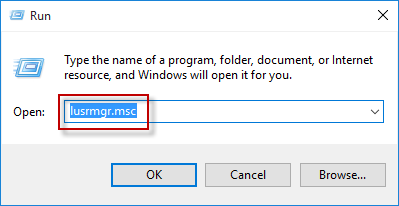
ไปยัง Local Users and Groups >> Users. On the right pane, double-click on your user account.
Select the check box of “Password never expired”, and then click on OK to disable Windows 10 password expiration.

Categories
เปลี่ยน วันหมดอายุ password windows
วิธีที่ 1 . Run gpedit.msc
Computer Configuration > Windows Settings > Security Settings > Local Policies > Security Options.

วิธีที่ 2 Run regedit and navigate to the following key:
HKEY_LOCAL_MACHINE\SOFTWARE\Microsoft\Windows NT\CurrentVersion\Winlogon
Set the value of PasswordExpiryWarning to the period you want and Exit.

Categories